From a 104-Minute CS2 Session to a Publishable Short
A good Counter-Strike session rarely arrives as a neat clip. It arrives as an hour or two of rounds, voice chat, missed shots, rotations, multi-kills, and a few moments worth keeping.
BigBoss Studio is the Windows production desk I built around that reality. It reads my Steam recordings and timeline events, helps me find promising rounds, lets me cut exact moments from the complete session, applies a reusable vertical-video design, and prepares the upload copy and schedule.
The files stay on my PC throughout editing. I can review the source, change every cut, and inspect the final render before anything reaches YouTube.
## The workflow starts with the whole session
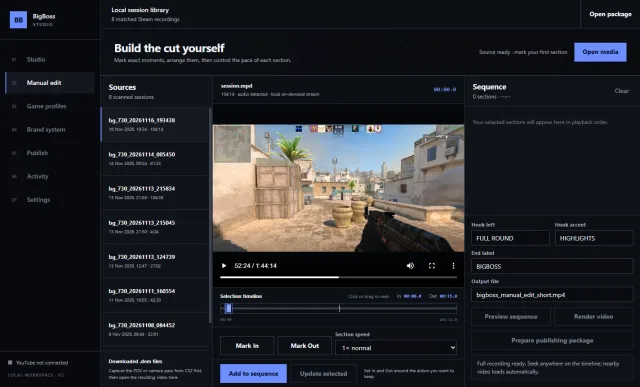
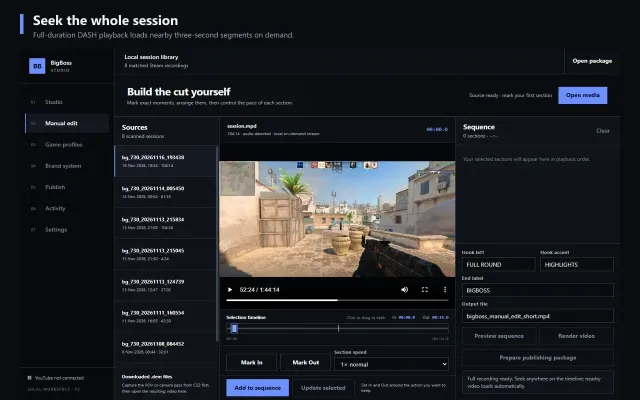
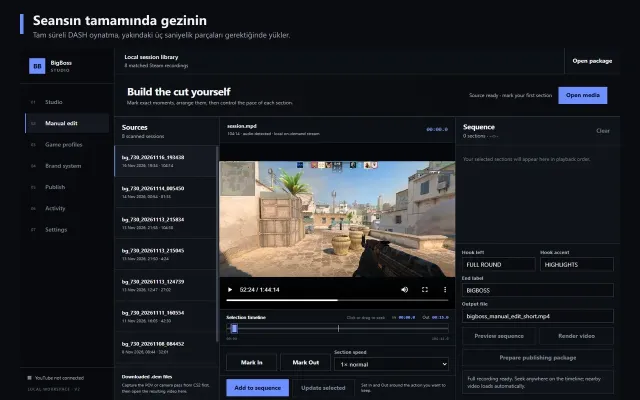
Steam Recording stores a session as an MPEG-DASH manifest with short video and audio segments. My test session below is 1 hour, 44 minutes, and 14 seconds long.
Earlier versions of the editor converted one minute at a time into temporary MP4 files. That made basic navigation feel like loading separate clips. The current player opens the full duration immediately. Clicking 52:24 or 1:35:43 requests the nearby three-second DASH segments, buffers them locally, and keeps one continuous playhead.
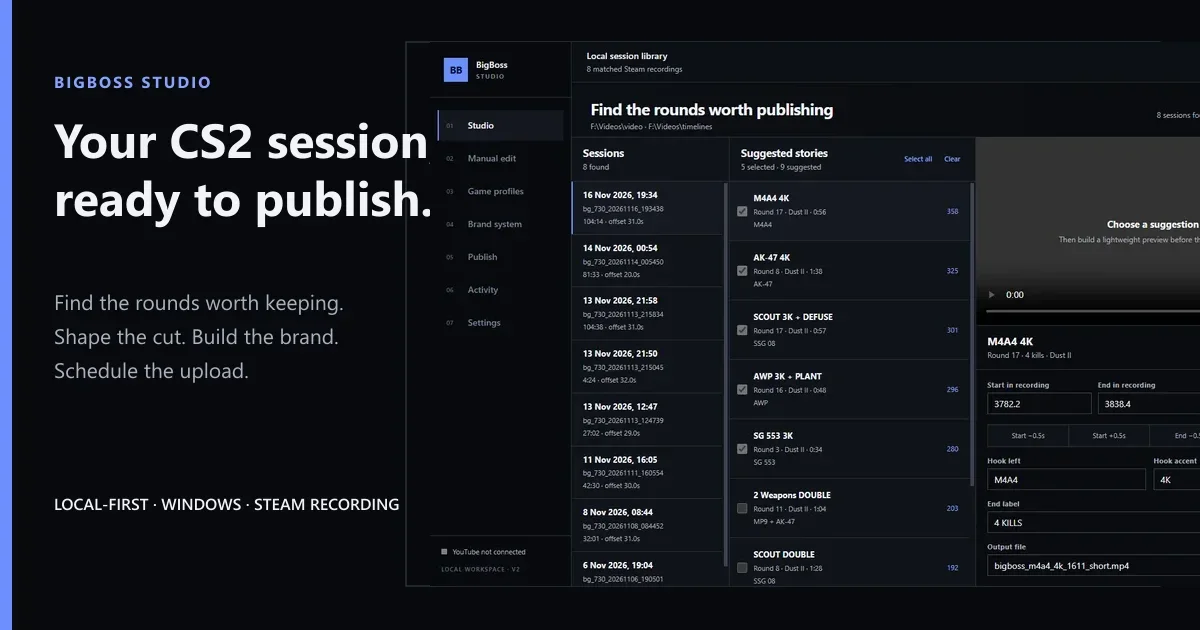
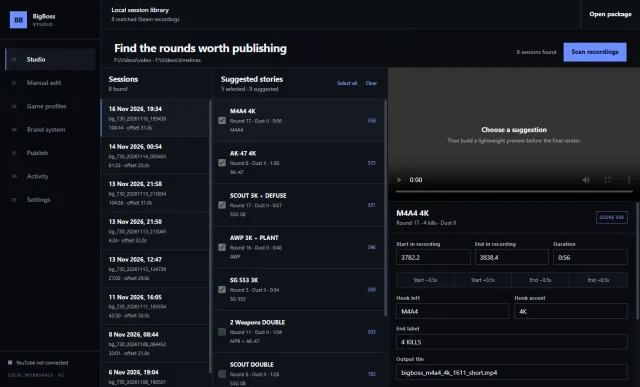
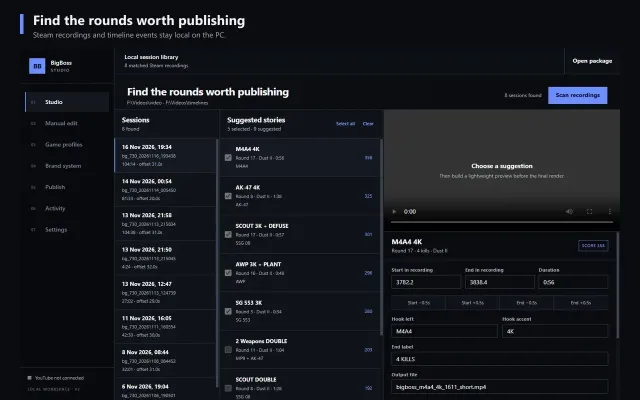
The suggestion is a starting point. Start and end times remain editable. A four-kill round can keep the setup and rotation instead of becoming four disconnected shots. A missed shot can stay when it gives the next hit more tension. The editor does not have to pretend every match was perfect.
Each suggestion carries:
- The round and map
- Kill count and weapon context
- Source-relative start and end times
- A working hook and end label
- A deterministic output filename
- A score for review priority
## Build the cut by hand when the story needs it
Manual Edit is for rounds that need more judgment than an automatic suggestion can provide.
The source list stays on the left, the full recording and timeline stay in the center, and the sequence stays on the right. I can add several sections from the same recording, reorder them, remove dead time, and choose a speed for each section. The preview uses the same sequence before the final FFmpeg render.
The important rule is simple: the visible action finishes before the cut. A title that says “4K” must show the fourth kill.
## Treat the overlay as a composition
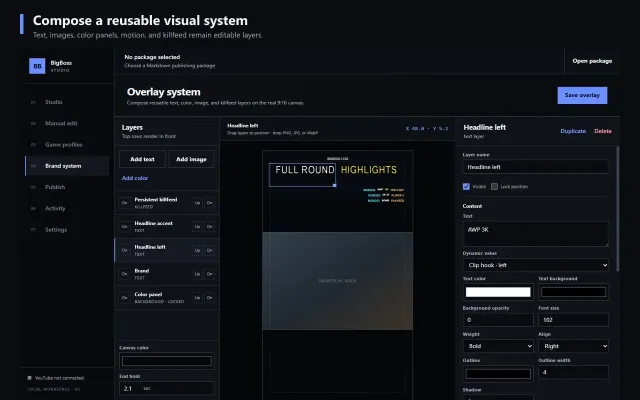
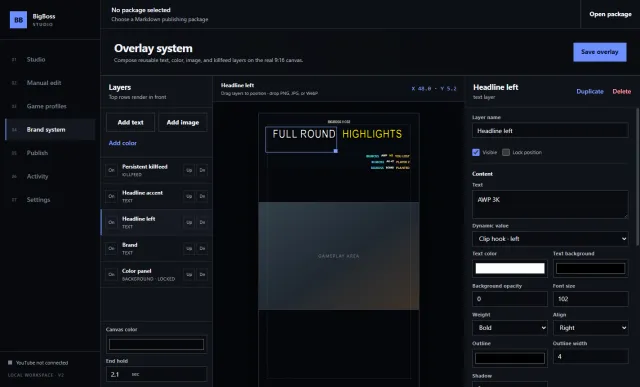
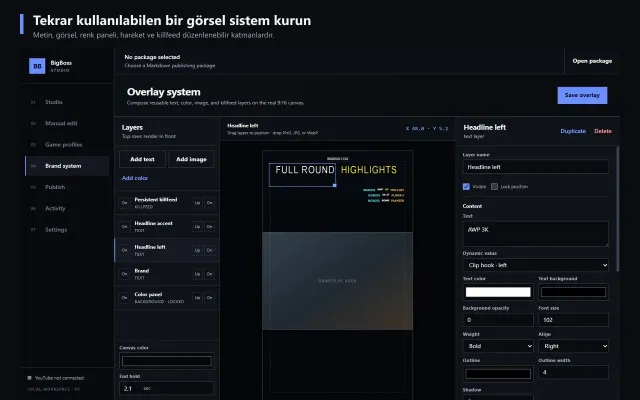
The visual system is built from layers instead of one fixed title card. Text, PNG logos, color panels, and the killfeed can be moved and timed independently.
Each layer can control:
- Position, width, height, and opacity
- Text content, dynamic clip values, font, weight, and alignment
- Text color, background color, outline, and shadow
- PNG, JPG, or WebP artwork
- Start and end time
- Entrance and exit behavior
- Animation duration and easing
- Front-to-back order, visibility, duplication, and locking
The center canvas is the real 9:16 composition. Layers can be dragged and resized directly. Gameplay remains the main surface, so branding lives around the action instead of covering the crosshair.
## Prepare the publishing package once
Rendered videos move into a publishing package with the same structure every time. Each item contains:
1. The exact local video path
2. An English YouTube title
3. A Turkish title
4. English and Turkish YouTube descriptions
5. English and Turkish TikTok copy
6. Discovery tags written for that specific video
The Publish view reads that package, checks the video format, assigns a playlist, and creates a schedule from one start date, time, timezone, and interval. The YouTube connection is stored in BigBoss Studio's stable application-data directory, so installing a new build does not intentionally replace the authorization file.
An optional OpenAI API key can draft publishing copy. Every field remains editable, and the deterministic copy generator still works when AI is disabled.
## Quick handbook
### 1. Configure the local sources
Open Settings and select the Steam recording folder, timeline folder, repository folder, export folder, and FFmpeg location. Choose the active game profile and audio defaults.
### 2. Scan a session
Open Studio and select Scan recordings. Pick a session from the left column and review the suggested stories in the middle column.
### 3. Check every ending
Open a suggestion, inspect the source timestamps, and build a preview. Extend the end time when the final elimination, reaction, scoreboard change, or round result is cut too early.
### 4. Create a manual sequence
Open Manual edit, choose a recording, and click anywhere on the full timeline to seek. Use Mark In and Mark Out, choose the section speed, then select Add to sequence. Repeat for each section and preview the combined cut.
### 5. Set the visual system
Open Brand system. Add or select a layer, adjust it in the inspector, and drag it on the canvas. Save the overlay when the default composition is ready. Individual clips can still override their hook and timing.
### 6. Render and review locally
Render the current story or the selected batch. Watch the exported file with game audio, microphone, and voice chat before preparing the publishing package.
### 7. Schedule the upload
Open Publish, load the package, choose the playlist, confirm the content type, and set the Istanbul date and time. Review each title and description before starting the upload run.
## What stays local
Scanning, playback, timeline analysis, overlay editing, previews, and FFmpeg rendering run on the Windows PC. The local media server listens only on 127.0.0.1 and accepts registered recording folders. It serves the DASH manifest and requested media segments to the embedded player; it does not expose the recording library to the network.
YouTube receives a file only when an upload run is started. The optional AI copy feature sends the text context needed for a draft only when it is enabled and requested.
## Technical stack
- Electron for the Windows desktop application
- dash.js and a loopback HTTP media server for full-duration Steam playback
- FFmpeg and ffprobe for inspection, previews, audio handling, and final renders
- Markdown publishing packages for portable, reviewable upload metadata
- YouTube Data API for uploads, scheduling, and playlist assignment
- Node's encrypted local storage path for persistent account and API-key settings
BigBoss Studio grew from a personal editing pipeline into a reusable product surface. The goal is still concrete: finish a long CS2 session with fewer forgotten clips, cuts that show the complete action, and a publishing package I can review before it goes live.
---
Suggested search tags: CS2 video editor, Steam Recording editor, Counter-Strike 2 highlights, YouTube Shorts workflow, TikTok gaming editor, local video editing, FFmpeg gaming clips, CS2 kill compilation, creator publishing tool, BigBoss Studio